Remix 3 is currently in beta and APIs are likely to change before the stable release later this year.
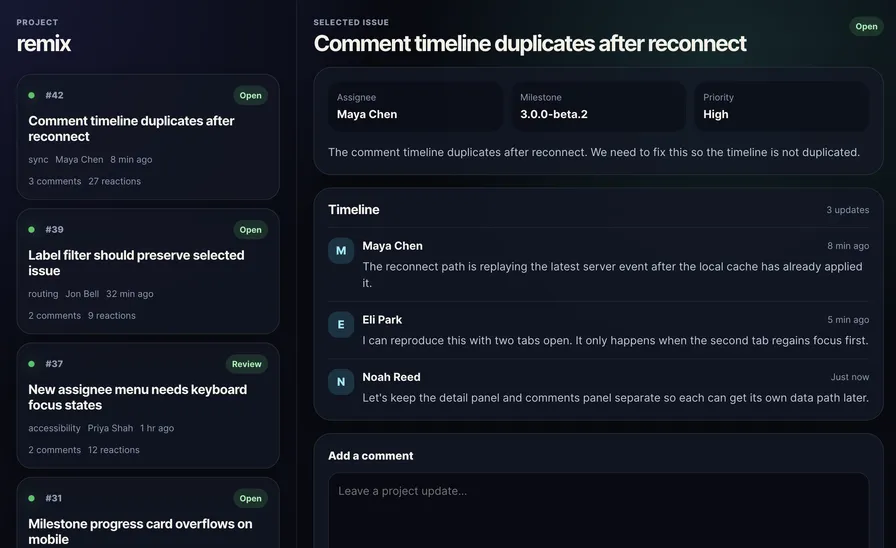
I recently read through Brenley Dueck’s excellent post on the new concepts in Solid 2.0 and it inspired me to take the same demo application and adapt it for Remix 3 to explore the same UX patterns in the framework I’m currently fixated on. It’s a simple issue browser, similar to what you would find in GitHub Projects or Linear or Jira with a left-hand sidebar of issues and the issue detail on the right with a form at the bottom for adding a comment to a specific issue.
You can follow along by cloning the blank branch of this GitHub repo or switching to the complete branch to see the implemented app.
Table of Contents
- Project Setup
- Databases & Data Loading
- Navigation
- Hydration
- Loading Boundaries
- Mutations
- Optimistic Mutations
- Pending Fades
- Wrap Up
Project Setup
This Remix app is built as an “unbundled” app, meaning that instead of using a bundler like Vite or Webpack or esbuild, the app runs via a runtime Node.js loader (remix/node-tsx) to transpile TypeScript and TSX on-demand and browser assets (TypeScript and TSX, CSS, etc.) are transpiled at request time and served via the remix/assets server. A Remix app can be used with a bundler (and is the only way to deploy a Remix app to some platforms, like Cloudflare), but Remix as a framework is designed to be “religiously runtime”, meaning all of the pieces are build-tool agnostic and build-tool independent and I think the unbundled architecture showcases that well.
The package.json for this project is strikingly small and simple and that’s one of the things I love about Remix: it’s a batteries-included framework.
{ "private": true, "type": "module", "imports": { "#/*": "./app/*" }, "scripts": { "dev": "node --watch --import remix/node-tsx server.ts", "start": "NODE_ENV=production node --import remix/node-tsx server.ts" }, "dependencies": { "remix": "3.0.0-beta.5" }, "devDependencies": { "@types/node": "^25.6.0", "@typescript/native-preview": "latest" }}We’re using native Node import aliases instead of TypeScript’s paths, since they work with or without a TypeScript-config-aware setup (e.g. if you want to use Node’s native TypeScript support). The only runtime dependency we need is the remix package. For development dependencies, we only need the types for Node and TypeScript itself. Our dev and start scripts just run the server.ts via node using the remix/node-tsx loader so that TSX gets processed before being loaded by Node, with dev running Node in watch mode.
One of my favorite things about Remix 3 is the route object at the center of the routing story:
import { get, post, resources, route } from "remix/routes";
export let routes = route({    assets: get("/assets/*path"),    index: get("/"),    issues: resources("/issues", { only: ["show"] }),    comments: { create: post("/comments/:issueId") },});
It gives you a single, central place to declare all your routes (including with Rails-style helpers for resource and resources and a nifty form helper as well) and lets you use the type-safe href builders to access your routes anywhere in your app:
routes.index.href(); // "/"routes.issues.show.href({ id: 42 }); // "/issues/42"The controller serving our issues page is fairly simple too:
import { DetailPanel } from "#/components/detail-panel.tsx";import { issues } from "#/data/data.ts";import { Document } from "#/layouts/document.tsx";import { routes } from "#/routes.ts";import { frameResponseInit } from "#/middleware.ts";
import * as s from "remix/data-schema";import * as coerce from "remix/data-schema/coerce";import { createController } from "remix/fetch-router";
export default createController(routes.issues, {    actions: {        async show({ headers, params, render }) {            if (headers.get("X-Remix-Target") === "detail") {                let id = s.parse(coerce.number(), params.id);                let issue = issues.find(issue => issue.id === id);                if (!issue) return new Response("Not Found", { status: 404 });                return render(<DetailPanel issue={issue} />, frameResponseInit());            }
            return render(<Document />);        },    },});
This is our first time encountering frames. We’re reading the X-Remix-Target header that we set in our frame handler, and if Remix is requesting the detail frame then we get the issue for the id and return just the DetailPanel component. Otherwise we return the full document (which itself will request the detail frame).
Frames can be used for a ton of different things, but if you’re coming from another web framework, one of the simplest ways to think about them is in terms of nested routing. You can use the <Frame> component in a similar way to the <Outlet> component in React Router, but instead of structuring your route tree around your UI, you structure it holistically and return specific components for specific frames within page requests, like above.
If we look at the <Document> component, we can see where the frame is nested within our root layout:
import { IssueColumn } from "#/components/issue-column.tsx";import { issues } from "#/data/data.ts";import { routes } from "#/routes.ts";import { getContext } from "remix/middleware/async-context";import { Frame } from "remix/ui";
export function Document() {    let { url } = getContext();
    return () => (        <html lang="en">            <head>{/* ... */}</head>            <body>                <div id="root">                    <main class="app-shell">                        <IssueColumn issues={issues} />                        <Frame name="detail" src={url.toString()} />                    </main>                </div>            </body>        </html>    );}
When a user requests the document at /issues/42, the issues controller returns the <Document>. While processing the <Document> to a stream using renderToStream(), Remix will resolve the opaque frame it comes across by making another request to our router at /issues/42, but this time with the header X-Remix-Target set to detail.
renderToStream(jsxNode, {    frameSrc: url,    async resolveClientEntry(entryId, component) {        // We'll talk about this later...    },    async resolveFrame(src, target, ctx) {        let frameUrl = new URL(src, ctx?.currentFrameSrc || url);
        // We set the target header based on what the Remix runtime tells us the target frame is        let headers = new Headers({ accept: "text/html" });        if (target) headers.set("X-Remix-Target", target);
        let response = await router.fetch(new Request(frameUrl, { headers }));
        if (!response.ok) {            throw new Error(`Failed to resolve frame ${frameUrl.pathname}`);        }
        return response.body ?? (await response.text());    },});
The subsequent fetch to the router will resolve with our <DetailPanel> component and the document will be assembled and streamed down to the user. In the future, if the user is making a same-origin request to another endpoint, we can have Remix fetch just one frame instead of the whole document in order to reduce the response payload and to provide a more seamless, single-page user experience. If frame endpoints take a while to resolve, we can also provide loading placeholders for them and let them stream in their contents to replace the placeholder when they’re ready. More on that later.
The <IssueColumn> component we’re utilizing in our <Document> is currently a simple list of issues driven by the static, in-memory data:
import type { Issue } from "#/data/data.ts";
import { Handle } from "remix/ui";
type IssueColumnProps = {    issues: readonly Issue[];};
export function IssueColumn(handle: Handle<IssueColumnProps>) {    return () => (        <section aria-label="Issues" class="issue-column">            <header class="toolbar">                <div>                    <p class="eyebrow">Project</p>                    <h2>remix</h2>                </div>            </header>
            <div class="issue-list">                {handle.props.issues.map(issue => (                    <IssueCard issue={issue} />                ))}            </div>        </section>    );}
function IssueCard(handle: Handle<{ issue: Issue }>) {    return () => (        <a>            <article class={"issue-card"} style={{ opacity: 1 }}>                <div class="issue-card-header">                    <span aria-hidden="true" class="status-dot" />                    <span class="issue-number">#{handle.props.issue.id}</span>                    <span class="issue-status">{handle.props.issue.status}</span>                </div>                <h3>{handle.props.issue.title}</h3>                <div class="issue-meta">                    <span>{handle.props.issue.area}</span>                    <span>{handle.props.issue.author}</span>                    <span>{handle.props.issue.updated}</span>                </div>                <div aria-label="Issue activity" class="issue-stats">                    <span>{handle.props.issue.comments} comments</span>                    <span>{handle.props.issue.reactions} reactions</span>                </div>            </article>        </a>    );}
One thing to note here that may not be obvious when coming from other JSX frameworks: Remix components return functions! Why is that? Well, Remix components have two separate scopes: the setup scope and the render scope.
import type { Handle } from "remix/ui";
import { on } from "remix/ui";
function Counter(handle: Handle) {    // Setup scope    let count = 0;
    return () => {        // Render scope        let double = count * 2;        return (            <div>                <span>                    Double {count} is {double}                </span>                <button                    mix={on("click", () => {                        count++;                        handle.update();                    })}                >                    Increment                </button>            </div>        );    };}
If you’re coming from React, you’re used to the entire component being the render scope. The entire component re-runs every time an update is triggered (via setState() or similar) and produces a new vDOM tree to be reconciled with the existing vDOM tree. Special helpers like hooks are necessary in order to preserve stable values across renders when created within the component.
If you’re coming from Solid, you’re used to the entire component being the setup scope. The entire component runs exactly once and returns a real DOM tree (e.g. a <div> JSX element in Solid is an HTMLDivElement) with pinpoint reactive listeners attached to each DOM node itself for fine-grained updates using signals.
Remix works a little more like Vue (pre-Vapor): in the setup scope, you can declare variables, attach event listeners, and do any other work you need to run once and survive re-renders. From the setup scope you return a function, which is the render scope. From within the render scope, you return a JSX vDOM tree and that render scope function is re-run every time an update is requested, using a classic vDOM diffing algorithm to reconcile the previous tree and the new tree.
Where Remix’s component rendering model differs from the Vue (and basically every other major JavaScript framework besides Lit) component rendering model is state. Most frameworks use some sort of reactive primitive, from hooks to composables to signals to runes to automatically notify listeners (including components and views) when they need to update and/or re-run. Remix uses plain JavaScript variables, closures, and manual updates. We’ll talk more about this later.
Our <IssueColumn> and <IssueCard> components are just returning render functions and are not utilizing the setup scope yet because they’re server-only components at the moment. They run once per request only on the server and produce a markup stream via Remix’s renderToStream() helper function.
Now that we’ve seen the scaffolding and have gotten the lay of the land, we can start to implement the features from Brenley’s example and see some of the more interesting features of Remix.
Databases & Data Loading
Remix is inherently a server-first framework, but it’s also Rails-like in its scope. It’s very batteries-included. You get a client-side framework, server-side rendering, hydration primitives, a server-side router, a route-building DSL, a Standard Schema compatible validation library, a SQL query builder and migration runner, authentication helpers, a test runner, cookie & session handling, (S3) file storage handling, and numerous other packages with more on the way. For this demo, we’re going to take advantage of that and move our data from memory into a local SQLite database using node:sqlite and remix/data-table/sqlite and serve that data by fetching from the database directly in our controller handlers.
import { column as c, table, type TableRow } from "remix/data-table";
export let Issues = table({    name: "issues",    columns: {        id: c.integer().primaryKey(),        title: c.text().notNull(),        area: c.text().notNull(),        status: c.text().notNull(),        author: c.text().notNull(),        updated: c.text().notNull(),        comments: c.integer().notNull().default(0),        reactions: c.integer().notNull().default(0),        active: c.boolean().notNull().default(false),        assignee: c.text(),        milestone: c.text(),        priority: c.text(),        description: c.text().notNull(),    },});
export let Comments = table({    name: "comments",    columns: {        id: c.integer().primaryKey(),        issueId: c.integer().notNull().references("issues", "id"),        author: c.text().notNull(),        time: c.text(),        body: c.text().notNull(),    },});
export type Issue = TableRow<typeof Issues>;export type Comment = TableRow<typeof Comments>;
SQL schemas in Remix are defined in a way very similar to Drizzle, using TypeScript directly. Once we have our tables defined, we can reimplement our async “API” functions on top of remix/data-table.
import { setTimeout } from "node:timers/promises";
import { db } from "#/data/db.ts";import { Comments, Issues, type Issue } from "#/data/tables.ts";
export async function getIssues() {    await setTimeout(400);    return await db.findMany(Issues, { orderBy: ["id", "desc"] });}
export async function getIssue(id: number) {    await setTimeout(400);    return await db.findOne(Issues, { where: { id } });}
export async function getComments(issueId: number) {    await setTimeout(1000);    return await db.findMany(Comments, {        where: { issueId },        orderBy: ["id", "asc"],    });}
export async function addComment(issueId: number, body: string) {    await setTimeout(2000);    let issue = await db.findOne(Issues, { where: { id: issueId } });
    if (!issue) {        throw new Error(`Issue ${issueId} not found`);    }
    await db.create(Comments, {        issueId,        author: "Mark Malstrom",        time: new Date().toISOString(),        body,    });
    await db.update(Issues, issueId, { comments: issue.comments + 1 });
    return await getComments(issueId);}
remix/data-table provides a pretty bog-standard CRUD + query-builder API, which is nice. Feels familiar, straightforward, and easy to use.
Now we can retrofit the issues controller we looked at earlier to utilize these functions. Data loading in Remix is as easy as awaiting asynchronous function calls within your controller handlers and passing the results to the JSX components you’re rendering, like so:
export default createController(routes.issues, {    actions: {        async show({ headers, params, render }) {            if (headers.get("X-Remix-Target") === "detail") {                let id = s.parse(coerce.number(), params.id);                let issue = await getIssue(id);
                if (!issue) {                    return render(<div>Not Found</div>, { status: 404 });                }
                let comments = await getComments(id);
                return render(                    <DetailPanel comments={comments} issue={issue} />,                    frameResponseInit(),                );            }
            let issues = await getIssues();            return render(<Document issues={issues} />);        },    },});
Finally, we’ll tackle migrations. Remix has a built-in migration runner, which takes up.sql and down.sql files in a specified directory and runs a migration.
import { Env } from "#/data/schemas.ts";import { parseEnv } from "#/utils/parse-env.ts";import path from "node:path";import { DatabaseSync } from "node:sqlite";import * as s from "remix/data-schema";import { createMigrationRunner } from "remix/data-table/migrations";import { loadMigrations } from "remix/data-table/migrations/node";import { createSqliteDatabaseAdapter } from "remix/data-table/sqlite";
const { DATABASE_URL } = parseEnv(Env);
let Direction = s.union([s.literal("up" as const), s.literal("down" as const)]);let direction = s.parse(s.defaulted(Direction, "up"), process.argv[2]);let to = process.argv[3];
let sqlite = new DatabaseSync(DATABASE_URL);let adapter = createSqliteDatabaseAdapter(sqlite);let migrations = await loadMigrations(path.resolve("db/migrations"));let runner = createMigrationRunner(adapter, migrations);
let result = await runner[direction]({ to });console.log(direction + " complete", {    applied: result.applied.map(entry => entry.id),    reverted: result.reverted.map(entry => entry.id),});
Here we see the first example usage of remix/data-schema, which is another one of my favorite parts of Remix. It’s a Standard Schema compatible validation library with excellent support for parsing and validating FormData and URLSearchParams as well as standard data types. Here we use it as an argument parser for our migration script’s arguments.
We can wire these up in our package.json scripts:
{ // ... "scripts": { "dev": "node --watch --import remix/node-tsx server.ts", "start": "NODE_ENV=production node --import remix/node-tsx server.ts", "db:migrate": "node db/migrate.ts", "db:reset": "node db/reset.ts", },}Be sure to run the migration before starting the dev or production server.
Navigation
Next we should add a little interactivity. We can start by swapping out the detail frame using the sidebar. We can do this using the link() mixin.
// ...
import { link } from "remix/ui";
function IssueCard(handle: Handle<{ issue: Issue }>) {    return () => (        <a            mix={link(routes.issues.show.href({ id: handle.props.issue.id }), {                target: "detail",                resetScroll: false,            })}        >            <article class={"issue-card"} style={{ opacity: 1 }}>                <div class="issue-card-header">                    <span aria-hidden="true" class="status-dot" />                    <span class="issue-number">#{handle.props.issue.id}</span>                    <span class="issue-status">{handle.props.issue.status}</span>                </div>                <h3>{handle.props.issue.title}</h3>                <div class="issue-meta">                    <span>{handle.props.issue.area}</span>                    <span>{handle.props.issue.author}</span>                    <span>{handle.props.issue.updated}</span>                </div>                <div aria-label="Issue activity" class="issue-stats">                    <span>{handle.props.issue.comments} comments</span>                    <span>{handle.props.issue.reactions} reactions</span>                </div>            </article>        </a>    );}
We use our type-safe href builder to create a link to the show issue page for the <IssueCard>’s issue ID and pass that to the link() mixin. We also pass target for the frame we want to update when we navigate and resetScroll: false to prevent losing our scroll position as we navigate.
However, now we need to add the active class to the <article> when the current route matches handle.props.issue.id. We can do this for the initial document request on the server, but subsequent navigations only request new content for the detail frame, which the sidebar is not a part of. For active state after the initial navigation, we’ll need to add some client-side interactivity.
Hydration
Remix works fairly similarly to Astro in this regard. By default, all components run only on the server, are rendered to static HTML which is sent to the client, and are never themselves sent to the client to run as client-side JavaScript. If you want your component to be interactive in the browser, Remix asks you to wrap your component in a clientEntry() higher-order function to indicate to the runtime that you want to send the JavaScript for just that component to the browser.
This is different from most JavaScript frameworks like React or Solid, which default to full-page hydration and ship every component’s JavaScript to the client to be re-run when the page is initially hydrated. Even for components which are rendered once and never change, both their HTML and JavaScript must still be shipped to the browser.
Before we start writing our interactive component, we need to understand how interactive components get served in our unbundled architecture. All client assets (not in /public) are handled by our asset server from remix/assets:
import { routes } from "#/routes.ts";import { createAssetServer } from "remix/assets";import { createController } from "remix/fetch-router";import { redirect } from "remix/response/redirect";
const ASSET_BUILD_ID = process.env.ASSET_BUILD_ID ?? "local";
export let assets = createAssetServer({    basePath: "/assets",    rootDir: process.cwd(),    fingerprint: { buildId: ASSET_BUILD_ID },    fileMap: {        "app/*path": "app/*path",        "node_modules/*path": "node_modules/*path",    },    allow: ["app/assets/**/*", "app/routes.ts", "app/data/schemas.ts", "node_modules/**"],    deny: ["app/**/*.server.*", "server.ts"],    minify: true,    watch: false,    sourceMaps: process.env.NODE_ENV === "development" ? "external" : undefined,    scripts: {        define: {            "process.env.NODE_ENV": JSON.stringify(process.env.NODE_ENV ?? "development"),        },    },});
export default createController(routes, {    actions: {        // ...        async assets({ request }) {            return (await assets.fetch(request)) ?? new Response("Not Found", { status: 404 });        },    },});
The asset server processes TS, TSX, and CSS files at request time and serves them in minified, fingerprinted, and optimized versions whenever the browser asks for a file at /assets/*. Right now, it’s designated to serve files from app/assets/**/* and node_modules/** among a few other places. So this is where we’ll put our interactive component file. First I’ll show the entire component and then step through, feature-by-feature.
import type { Issue } from "#/data/tables.ts";import type { Handle } from "remix/ui";
import { routes } from "#/routes.ts";import { createMatcher } from "remix/route-pattern/match";import { addEventListeners, clientEntry, link } from "remix/ui";import * as s from "remix/data-schema";import * as coerce from "remix/data-schema/coerce";
let matcher = createMatcher(routes.issues.show.pattern);
export let IssueCard = clientEntry(    import.meta.url,    function IssueCard(handle: Handle<{ issue: Issue; selectedIssue: number }>) {        let selectedIssue = handle.props.selectedIssue;
        if (typeof window !== "undefined") {            addEventListeners(navigation, handle.signal, {                currententrychange() {                    let match = matcher.match(location.href);                    selectedIssue = s.parse(coerce.number(), match?.params.id);                    handle.update();                },            });        }
        return () => (            <a                mix={link(routes.issues.show.href({ id: handle.props.issue.id }), {                    target: "detail",                    resetScroll: false,                })}            >                <article                    class={                        selectedIssue === handle.props.issue.id ? "issue-card active" : "issue-card"                    }                    style={{ opacity: 1 }}                >                    <div class="issue-card-header">                        <span aria-hidden="true" class="status-dot" />                        <span class="issue-number">#{handle.props.issue.id}</span>                        <span class="issue-status">{handle.props.issue.status}</span>                    </div>                    <h3>{handle.props.issue.title}</h3>                    <div class="issue-meta">                        <span>{handle.props.issue.area}</span>                        <span>{handle.props.issue.author}</span>                        <span>{handle.props.issue.updated}</span>                    </div>                    <div aria-label="Issue activity" class="issue-stats">                        <span>{handle.props.issue.comments} comments</span>                        <span>{handle.props.issue.reactions} reactions</span>                    </div>                </article>            </a>        );    },);
The first and most important part is clientEntry().
import { clientEntry } from "remix/ui";
export let IssueCard = clientEntry(    import.meta.url,    function IssueCard(handle: Handle<{ issue: Issue; selectedIssue: number }>) {        // ...    },);
This higher-order function allows us to pass the URL of the current file (which we can handily obtain without hardcoding it using the magic JavaScript import.meta.url value) and a component which has client-side logic within it. The resulting component can be used in server-only components and will embed a marker for the Remix runtime to locate the source code so it can hydrate the component in the browser. It’s important to give your export and component function the same name, so that the resolver can extract it from the file automatically.
This is also where that resolveClientEntry() hook from our renderToStream() options earlier comes in. On the server, the hook receives the import.meta.url we passed to clientEntry() — a file:// URL — and translates it into a browser-loadable, fingerprinted URL using the asset server:
async resolveClientEntry(entryId, component) {    assert(        entryId.startsWith("file://"),        `Expected \`import.meta.url\` for clientEntry ID, received '${entryId}'`,    );
    let [filePath, fragment] = entryId.split("#");
    return {        href: await assets.getHref(filePath),        exportName: fragment || component.name || titleCaseFileName(filePath),    };}
The href/exportName pair is what gets embedded in the HTML comment marker for each hydrated component. The last piece of the puzzle is the client-side bootstrap, which boots the Remix runtime in the browser, dynamically imports each marked module from the asset server, and hydrates them from the server-rendered markup:
import { run } from "remix/ui";
run({    async loadModule(moduleUrl, exportName) {        let mod = await import(moduleUrl);        let exported = mod[exportName];
        if (typeof exported !== "function") {            throw new TypeError(                `Expected export '${exportName}' from '${moduleUrl}' to be a function`,            );        }
        return exported;    },    async resolveFrame(src, signal, target) {        let headers = new Headers({ accept: "text/html" });        if (target) headers.set("X-Remix-Target", target);        let response = await fetch(src, { headers, signal });        return response.body ?? (await response.text());    },});
Notice that the client gets its own resolveFrame() too — when the client-side router swaps a frame, this is the fetch that carries the X-Remix-Target header to our controller. We can then load the bootstrap (and our styles) in the <Document>’s head using fingerprint-aware URLs from the asset server:
import { assets } from "#/actions/root.ts";
const [STYLESHEET_HREF, ENTRY_HREF] = await Promise.all([    assets.getHref("app/assets/index.css"),    assets.getHref("app/assets/entry.ts"),]);
<link href={STYLESHEET_HREF} rel="stylesheet" /><script async src={ENTRY_HREF} type="module" />
Next, we should look at the actual interactivity and how it works mechanically in our app:
import { createMatcher } from "remix/route-pattern/match";import { addEventListeners } from "remix/ui";import * as s from "remix/data-schema";import * as coerce from "remix/data-schema/coerce";
let matcher = createMatcher(routes.issues.show.pattern);
export let IssueCard = clientEntry(    import.meta.url,    function IssueCard(handle: Handle<{ issue: Issue; selectedIssue: number }>) {        let selectedIssue = handle.props.selectedIssue;
        if (typeof window !== "undefined") {            addEventListeners(navigation, handle.signal, {                currententrychange() {                    let match = matcher.match(location.href);                    selectedIssue = s.parse(coerce.number(), match?.params.id);                    handle.update();                },            });        }
        return () => (            <a                mix={link(routes.issues.show.href({ id: handle.props.issue.id }), {                    target: "detail",                    resetScroll: false,                })}            >                <article                    class={                        selectedIssue === handle.props.issue.id ? "issue-card active" : "issue-card"                    }                    style={{ opacity: 1 }}                >                    {/* ... */}                </article>            </a>        );    },);
First, we’re setting up the local variable selectedIssue with an initial value derived from the component’s props. Then we add an event listener, guarded on the existence of the window variable. This is necessary since hydrated components still run on the server to produce their HTML output for the initial document and we can’t access window on the server. Inside of this event listener, we monitor the currententrychange event on the global navigation variable, to determine when the Remix client-side router has resolved to a new page. There we match routes.issues.show against location.href and if we get a match, we validate and extract the id parameter from the match using remix/data-schema and assign it to our local selectedIssue variable. Once our state is updated, we call handle.update() to tell the Remix runtime to re-run the render function with our new selectedIssue value.
But! You may notice that this introduces tearing! Our selected issue updates almost immediately and our detail frame updates a few seconds later. And as we learned in Brenley’s article, that’s generally an undesirable user experience. So how do we fix this?
It’s pretty simple actually. We just need to wait for the navigation.transition.finished to resolve if there’s a navigation.transition in flight inside of the currententrychange event.
function setSelectedIssue() {    let match = matcher.match(location.href);    selectedIssue = s.parse(coerce.number(), match?.params.id);    handle.update();}
addEventListeners(navigation, handle.signal, {    currententrychange() {        if (navigation.transition) {            // Aborted transitions reject with AbortError — a new            // currententrychange will fire for the replacing navigation.            navigation.transition.finished.then(                () => setSelectedIssue(),                () => {},            );        } else {            setSelectedIssue();        }    },});
Now we only update the selectedIssue variable once the current transition resolves if there’s a transition in flight.
This works, and it’s a good first look at the relatively new Navigation API, but hold onto your skepticism: waiting for the entire transition to finish is a blunt instrument, and it’s going to bite us in the next section. We’ll end up replacing this listener with something simpler and more precise before we’re done.
Loading Boundaries
We can make the page load even faster by atomizing our comments into their own frame and making that frame lazy load. We can go from this:
export function DetailPanel(handle: Handle<DetailPanelProps>) { return () => ( <section aria-label="Selected issue details" class="detail-panel"> <IssueHeader issue={handle.props.issue} /> <IssueSummary issue={handle.props.issue} /> <div style={{ opacity: 1 }}> <Timeline comments={handle.props.comments} issue={handle.props.issue} /> </div> <CommentComposer /> </section> );}to this:
export function DetailPanel(handle: Handle<DetailPanelProps>) {    let { url } = getContext();
    return () => (        <section aria-label="Selected issue details" class="detail-panel">            <IssueHeader issue={handle.props.issue} />            <IssueSummary issue={handle.props.issue} />            <Frame                name="comments"                src={url.toString()}                fallback={                    <LoadingState label="Loading comments" detail="Preparing the timeline." />                }            />            <CommentComposer />        </section>    );}
And now we can update our /issues/:id controller with a new branch to handle the comments frame:
export default createController(routes.issues, {    actions: {        async show({ headers, params, render }) {            let target = headers.get("X-Remix-Target");            let id = s.parse(coerce.number(), params.id);
            let issue = await getIssue(id);
            if (!issue) {                return render(<div>Not Found</div>, { status: 404 });            }
            if (target === "detail") {                return render(<DetailPanel issue={issue} />, frameResponseInit());            }
            if (target === "comments") {                let comments = await getComments(id);
                return render(                    <div style={{ opacity: 1 }}>                        <Timeline comments={comments} issueId={id} />                    </div>,                    frameResponseInit(),                );            }
            let issues = await getIssues();            return render(<Document issues={issues} selectedIssue={id} />);        },    },});
One disadvantage of this, however, is that due to our navigation.transition.finished trick from earlier, making our detail frame appear earlier than the navigation itself completes means that even though it will appear that our page has changed and we’re just waiting on comments to load, our selected issue in the sidebar will not have changed state yet because the transition isn’t truly finished until the comments finish loading.
And there’s the problem I warned about: waiting for the whole transition is only really an approximation of what we want. We really want to just wait until the new issue is on screen. Once we’ve built up some client-side eventing machinery in the following sections, we’ll be able to implement a more precise fix.
Mutations
Now let’s give our users a way to add some comments. The simplest way to do this is to utilize Remix’s formData() middleware and then revalidate the comments frame. For this, we’ll need another hydrated component.
import { routes } from "#/routes.ts";import { clientEntry, Handle, navigate, on } from "remix/ui";
export let CommentComposer = clientEntry(    import.meta.url,    function CommentComposer(handle: Handle<{ issueId: number }>) {        return () => {            let { issueId } = handle.props;
            return (                <form                    action={routes.comments.create.href({ issueId })}                    method={routes.comments.create.method}                    class="composer"                    mix={on("submit", async event => {                        event.preventDefault();
                        let form = event.currentTarget;
                        let response = await fetch(form.action, {                            body: new FormData(form, event.submitter),                            method: form.method,                        });
                        if (response.ok) {                            await navigate(location.href, {                                target: "comments",                                resetScroll: false,                            });                            form.reset();                        }                    })}                >                    <label for="comment">Add a comment</label>                    <textarea                        id="comment"                        name="comment"                        placeholder="Leave a project update..."                        rows={4}                    />                    <div class="composer-actions">                        <button type="submit">Comment</button>                    </div>                </form>            );        };    },);
This hydrated component uses the on mixin to add a submit event listener to our <form> that performs a POST to our routes.comments.create endpoint when there’s no JavaScript loaded and a manual fetch submission to the same endpoint when there is JavaScript, reloading just our comments frame via Remix’s navigate() function on a successful POST (Yay! Progressive enhancement!).
For the server side of this equation, we just need a few lines of code to implement our routes.comments.create controller handler. But first we need a schema with which we’ll parse our form data:
import * as s from "remix/data-schema";import * as coerce from "remix/data-schema/coerce";import * as f from "remix/data-schema/form-data";
// ...
export let IssueIdSchema = s.object({    issueId: coerce.number(),});
export let AddCommentSchema = f.object({    comment: f.field(s.string()),});
Like I said: remix/data-schema has excellent FormData parsing and validation support. So simple, so easy.
Then, our controller:
import { routes } from "#/routes.ts";import { createController } from "remix/fetch-router";import { redirect } from "remix/response/redirect";import * as s from "remix/data-schema";import { AddCommentSchema, IssueIdSchema } from "#/data/schemas.ts";import { addComment } from "#/data/issues.ts";
export default createController(routes.comments, {    actions: {        async create({ params, formData }) {            let { issueId } = s.parse(IssueIdSchema, params);            let { comment } = s.parse(AddCommentSchema, formData);            await addComment(issueId, comment);
            return redirect(routes.issues.show.href({ id: issueId }));        },    },});
And it’s that easy. Now we can submit comments on any issue!
But, the user experience here isn’t great. We’re making the user wait 2 full seconds before anything happens without giving them any indication that something is happening. And — worst of all — we have all the data we need to update the UI right there in the browser. We’re just waiting on a slow connection or a slow database to save it and send it right back to us.
That brings us to…
Optimistic Mutations
One brilliant thing about Remix is that a vast majority of its packages can be used in the server or the browser since they’re all built on web standard APIs. So we can just run the same validation code we’re already running on the server in our hydrated component ahead of time and simply roll it back if the server returns an error.
But, how do we access component state across <Frame>s? Well, we could try to share context, but we end up in an awkward position where one frame resolves on the server without access to the context of the other… So what do we do?
It turns out, Remix Frames actually expose their own handle which is itself an EventTarget! So we can use the frame itself as the communication channel between the client entry components on either side of its boundary.
First, we need to reorganize some of our components. The composer needs to be able to reach the comments frame’s handle, and both sides of the boundary need to hydrate, so let’s gather everything comment-related into one client entry in app/assets/comments.tsx and render that from the server-only <DetailPanel> (comment-composer.tsx from the last section moves in here too, becoming a plain function; since the Comments island renders it, it hydrates right along with it and no clientEntry() wrapper is needed).
export function DetailPanel(handle: Handle<DetailPanelProps>) {    let { url } = getContext();
return () => ( <section aria-label="Selected issue details" class="detail-panel"> <IssueHeader issue={handle.props.issue} /> <IssueSummary issue={handle.props.issue} /> <Comments issueId={handle.props.issue.id} src={url.toString()} /> </section> );}import { routes } from "#/routes.ts";import { addEventListeners, clientEntry, Frame, Handle, on, ref, SerializableProps, TypedEventTarget,} from "remix/ui";import * as s from "remix/data-schema";import { AddCommentSchema } from "#/data/schemas.ts";import type { Comment } from "#/data/tables.ts";import { LoadingState } from "#/assets/loading-state.tsx";
const IS_SERVER = typeof window === "undefined";
export namespace Comments { export interface Props extends SerializableProps { src: string; issueId: number; }}
export let Comments = clientEntry( import.meta.url, function Comments(handle: Handle<Comments.Props>) { return () => ( <> <Frame key={handle.props.issueId} name="comments" src={handle.props.src} fallback={ <LoadingState label="Loading comments" detail="Preparing the timeline." /> } /> <CommentComposer issueId={handle.props.issueId} /> </> ); },);Take note of the key prop on our <Frame>: keying the frame by issue ID tears it down and remounts it whenever the user navigates to a different issue, which gives every issue its own fresh loading boundary instead of leaving the previous issue’s timeline on screen while the new one loads.
Next, the optimistic state itself. We’ll keep it in a small store — a plain class holding plain data, extending TypedEventTarget (just an EventTarget with stronger TypeScript support) so the timeline can subscribe to changes — plus a custom event to carry an optimistic comment across the frame boundary:
const CHANGE = "change";const OPTIMISTIC_ADD = "optimistic-add";
interface CommentStoreEventMap {    [CHANGE]: Event;}
// A real Event subclass so the optimistic payload is typed at the listener// via `instanceof` — no cast needed to read it back off the eventclass OptimisticCommentEvent extends Event {    comment: Comment;    constructor(comment: Comment) {        super(OPTIMISTIC_ADD);        this.comment = comment;    }}
class CommentStore extends TypedEventTarget<CommentStoreEventMap> {    submitting = false;    comments: Comment[];
    // Render-time sync: adopt the latest server truth    // unless we're holding an optimistic entry    sync(latest: Comment[]) {        if (!this.submitting) {            this.comments = latest;        }    }
    // Show an optimistic comment immediately and hold    // server truth back until the reload settles    addOptimisticComment(comment: Comment) {        this.submitting = true;        // new array so we never mutate the props-provided list adopted by sync()        this.comments = [...this.comments, comment];        this.dispatchEvent(new Event(CHANGE));    }
    // The frame reload finished, so release the hold    // and let the next render adopt server truth    settle() {        this.submitting = false;        this.dispatchEvent(new Event(CHANGE));    }
    constructor(comments: Comment[] = []) {        super();        this.comments = comments;    }}
This sets up the plumbing we need to communicate between these two hydrated islands. Now we can attach them, being careful to only attach the client functionality if we’re not on the server.
export let Timeline = clientEntry(    import.meta.url,    function Timeline(handle: Handle<{ comments: Comment[]; issueId: number }>) {        let store = new CommentStore(handle.props.comments);
        if (!IS_SERVER) {            // store mutations -> repaint            addEventListeners(store, handle.signal, {                change() {                    handle.update();                },            });
            // optimistic add, dispatched from the composer outside the frame            handle.frame.addEventListener(                OPTIMISTIC_ADD,                event => {                    // instanceof narrows Event -> OptimisticCommentEvent, no cast                    if (event instanceof OptimisticCommentEvent) {                        store.addOptimisticComment(event.comment);                    }                },                { signal: handle.signal },            );
            // reload done -> fresh server truth is in props -> release the hold            addEventListeners(handle.frame, handle.signal, {                reloadComplete() {                    store.settle();                },            });        }
        return () => {            store.sync(handle.props.comments);
            return (                <section aria-labelledby="timeline-heading" class="timeline">                    <div class="section-heading">                        <h3 id="timeline-heading">Timeline</h3>                        <span>{store.comments.length} updates</span>                    </div>                    {store.comments.map(comment => (                        <CommentCard comment={comment} />                    ))}                </section>            );        };    },);
function CommentCard(handle: Handle<{ comment: Comment }>) {    return () => (        <article class="comment-card">            <div aria-hidden="true" class="avatar">                {handle.props.comment.author.charAt(0)}            </div>            <div>                <div class="comment-heading">                    <strong>{handle.props.comment.author}</strong>                    <span>                        {handle.props.comment.id < 0 ? "Saving..." : handle.props.comment.time}                    </span>                </div>                <p>{handle.props.comment.body}</p>            </div>        </article>    );}
We make sure to read handle.props.comment.id and if it’s a fake ID, we show the Saving... indicator to let the user know their comment is processing. Dispatching this event is as easy as calling handle.frames.get("comments").dispatchEvent():
function CommentComposer(handle: Handle<{ issueId: number }>) {    let textarea: HTMLTextAreaElement | undefined;
    return () => {        let { issueId } = handle.props;
        return (            <form                action={routes.comments.create.href({ issueId })}                method={routes.comments.create.method}                class="composer"                mix={on("submit", async event => {                    event.preventDefault();
                    let form = event.currentTarget;                    let formData = new FormData(form, event.submitter);                    let { comment } = s.parse(AddCommentSchema, formData);
                    // resolve the shared frame at submit time, then hand the                    // optimistic comment across the boundary                    let frame = handle.frames.get("comments");                    frame?.dispatchEvent(                        new OptimisticCommentEvent({                            id: -Date.now(),                            issueId,                            author: "Mark Malstrom",                            // placeholder — the negative id marks this as pending, so the                            // card shows "Saving..." instead of this value until settle                            time: "",                            body: comment,                        }),                    );                    form.reset();
                    let requestFailed = false;
                    try {                        let response = await fetch(form.action, {                            body: formData,                            method: form.method,                        });                        requestFailed = !response.ok;                    } catch {                        requestFailed = true;                    }
                    if (requestFailed && textarea) {                        // restore the comment in the case of an error                        textarea.value = comment;                    }
                    // reload the comments frame; its reloadComplete                    // event then releases the optimistic hold                    await frame?.reload();                })}            >                <label for="comment">Add a comment</label>                <textarea                    mix={ref(node => (textarea = node))}                    id="comment"                    name="comment"                    placeholder="Leave a project update..."                    rows={4}                />                <div class="composer-actions">                    <button type="submit">Comment</button>                </div>            </form>        );    };}
Notice we also swapped navigate(location.href, { target: "comments" }) for frame?.reload() — we already resolved the frame’s handle to dispatch our optimistic event, so we can now just use it to revalidate directly instead of routing a whole navigation through the Navigation API.
Now we’ve wired up all the optimistic state. And submitting a comment adds it immediately to the comment <Timeline>.
We’re orchestrating the optimistic updates manually in this example, but that’s one of the things I like about Remix: you don’t have to rely on the framework building in specific primitives for certain patterns. It’s very vanilla in that way and you can implement just about any pattern you want here using web & browser primitives.
Optimistic Issue Count
Now, I noticed the same thing Brenley did in his Solid demo project: the comment count in the sidebar isn’t updating! Neither for our optimistic count nor our actual comment count after submitting a message. This is because of this line right here:
await frame?.reload();When our POST resolves, we only revalidate the comments frame. That leaves the rest of the app alone — and our sidebar, which lives entirely outside of the comments frame, never gets new data. Here’s how we can fix that, both for optimistic comments and for server-rendered comments. First we need a new event:
const COMMENT_COUNT = "commentcount";
/** * Broadcast on `window` whenever an issue's live comment count changes — * optimistically on submit and again once the reload settles. */export class CommentCountEvent extends Event {    issueId: number;    count: number;    constructor(issueId: number, count: number) {        super(COMMENT_COUNT);        this.issueId = issueId;        this.count = count;    }}
declare global {    interface WindowEventMap {        [COMMENT_COUNT]: CommentCountEvent;    }}
This time we’re dispatching on window instead of on a frame handle, for two reasons:
- The timeline lives inside a frame that we tear down and remount on every navigation, while the sidebar lives entirely outside of any frame. A stable, global event bus that both sides can always reach is exactly what
windowalready is. - Check out that
declare globalblock: becauseWindowEventMapis aninterface, we can declaration-merge our custom events right into it, and everywindowlistener for"commentcount"becomes fully typed at the call site — noinstanceofnarrowing needed. (FrameHandle’s event map is currently a closedtypealias, which is why ouroptimistic-addevent from earlier had to fall back to the untypedaddEventListeneroverload plus aninstanceofcheck.)
Then we can broadcast the count from our Timeline component whenever the store changes:
function Timeline(handle: Handle<{ comments: Comment[]; issueId: number }>) {    let store = new CommentStore(handle.props.comments);
    if (!IS_SERVER) {        // store mutations -> repaint, then broadcast the live count after        // render-time sync (optimistic on add, server value after settle)        addEventListeners(store, handle.signal, {            change() {                handle.queueTask(signal => {                    if (signal.aborted) return;
                    window.dispatchEvent(                        new CommentCountEvent(handle.props.issueId, store.comments.length),                    );                });                handle.update();            },        });        // ...the optimistic-add and reloadComplete listeners from before...    }
    return () => {        /* ... */    };}
handle.queueTask() is important here. The task runs after handle.update() renders, giving store.sync() a chance to adopt the latest server comments before we read the count. The optimistic add still broadcasts immediately after its render, while settling broadcasts the server value instead of the optimistic one.
Then in our IssueCard component:
export let IssueCard = clientEntry(    import.meta.url,    function IssueCard(handle: Handle<{ issue: Issue; selectedIssue: number }>) {        let selectedIssue = handle.props.selectedIssue;        let commentCount = handle.props.issue.comments;
        if (typeof window !== "undefined") {            // ...
            // the comments timeline broadcasts its live count on `window`;            // adopt it when it's for this card's issue (optimistic + settled)            addEventListeners(window, handle.signal, {                commentcount(event) {                    if (event.issueId === handle.props.issue.id) {                        commentCount = event.count;                        handle.update();                    }                },            });        }
        return () => {            /* ... */        };    },);
Announcing the Shown Issue
Our sidebar highlight still waits on navigation.transition.finished, and with the comments frame streaming in lazily, the transition isn’t finished until the comments are, so the highlight lags seconds behind what the user is actually looking at.
But now we have all the machinery to fix it. Our Comments component’s render function runs at the exact moment a new issue’s detail hits the screen. It doesn’t need to wait for anything or parse any URLs; it already knows exactly which issue just rendered. So we can just have it announce that:
const ISSUE_SHOWN = "issueshown";
/** * Broadcast on `window` when the comments island renders for an issue — i.e. * the moment that issue's detail is on screen, before its comments finish * loading. */export class IssueShownEvent extends Event {    issueId: number;    constructor(issueId: number) {        super(ISSUE_SHOWN);        this.issueId = issueId;    }}
declare global { interface WindowEventMap { [ISSUE_SHOWN]: IssueShownEvent; [COMMENT_COUNT]: CommentCountEvent; }}export let Comments = clientEntry( import.meta.url, function Comments(handle: Handle<Comments.Props>) { return () => { if (!IS_SERVER) { window.dispatchEvent(new IssueShownEvent(handle.props.issueId)); }
return <>{/* ... */}</>; }; },);And in IssueCard, we can now delete the entire createMatcher/navigation listener — the URL parsing, the schema validation, the transition juggling, all of it — and replace it with one typed listener:
import { Issue } from "#/data/tables.ts";import { routes } from "#/routes.ts";import { addEventListeners, clientEntry, Handle, link } from "remix/ui";
export let IssueCard = clientEntry(    import.meta.url,    function IssueCard(handle: Handle<{ issue: Issue; selectedIssue: number }>) {        let selectedIssue = handle.props.selectedIssue;        let commentCount = handle.props.issue.comments;
        if (typeof window !== "undefined") {            addEventListeners(window, handle.signal, {                // highlight this card the moment its issue's detail is on screen —                // the comments island announces it as it renders, so we no longer                // wait for the navigation (and its comments) to fully settle                issueshown(event) {                    selectedIssue = event.issueId;                    handle.update();                },                // adopt the live comment count when it's for this card's issue                commentcount(event) {                    if (event.issueId === handle.props.issue.id) {                        commentCount = event.count;                        handle.update();                    }                },            });        }
        return () => {            /* ... */        };    },);
Two tiny event classes, a declare global block, and zero framework-specific primitives. Simple. Easy. Done.
Pending Fades
There’s one affordance left from Brenley’s post that we haven’t implemented: isPending. In his Solid demo, the detail panel fades to half opacity while a newly selected issue loads and the clicked card in the sidebar dims until the selection commits. Remix has no isPending primitive, but now we have all the raw materials to build the affordance ourselves.
The sidebar half is small. Mixins compose, so we can put a plain click listener next to our link() mixin, flip a local pending variable, and let the issueshown listener we already have clear it. And that hardcoded opacity: 1 we’ve had in the markup since Brenley’s original demo finally has a purpose:
export let IssueCard = clientEntry(    import.meta.url,    function IssueCard(handle: Handle<{ issue: Issue; selectedIssue: number }>) {        let pending = false;        // ...
        if (typeof window !== "undefined") {            addEventListeners(window, handle.signal, {                issueshown(event) {                    // any arriving issue settles (or supersedes) the pending navigation                    pending = false;                    selectedIssue = event.issueId;                    handle.update();                },                // ...            });        }
        return () => (            <a                mix={[                    link(routes.issues.show.href({ id: handle.props.issue.id }), {                        target: "detail",                        resetScroll: false,                    }),                    // dim this card while its navigation is in flight —                    // `issueshown` clears it once the new detail is on screen                    on("click", () => {                        pending = true;                        handle.update();                    }),                ]}            >                <article class={/* ... */} style={{ opacity: pending ? 0.5 : 1 }}>                    {/* ... */}                </article>            </a>        );    },);
The detail panel is more interesting: we want to dim the outgoing issue while the next one loads. Luckily, the detail frame itself knows about that window: every FrameHandle announces reloadStart when a navigation targets it and reloadComplete when the reload finishes. So we wrap the detail frame in one more tiny client entry that holds its handle and toggles a class:
<main class="app-shell"> <IssueColumn issues={handle.props.issues} selectedIssue={handle.props.selectedIssue} /> <DetailFrame src={url.toString()} /></main>import { addEventListeners, clientEntry, Frame, Handle } from "remix/ui";
export let DetailFrame = clientEntry( import.meta.url, function DetailFrame(handle: Handle<{ src: string }>) { let pending = false;
function settle() { if (pending) { pending = false; handle.update(); } }
if (typeof window !== "undefined") { // the new issue is on screen the moment its comments island renders — // settle then, not when the reload stream closes (the nested comments // frame keeps it open while the timeline loads) addEventListeners(window, handle.signal, { issueshown: settle, });
// the frame mounts during this island's first render, so resolve // its handle in a task that runs after the DOM has been updated handle.queueTask(() => { let frame = handle.frames.get("detail"); if (!frame) return;
addEventListeners(frame, handle.signal, { reloadStart() { pending = true; handle.update(); }, // backstop for detail content that never announces an issue // (e.g. a not-found response renders no comments island) reloadComplete: settle, }); }); }
return () => ( <div class={pending ? "detail-slot pending" : "detail-slot"}> <Frame name="detail" src={handle.props.src} /> </div> ); },);Two details here are worth pointing out:
First, handle.queueTask(). The frame doesn’t exist yet during the component’s setup scope (this component’s own render function is what mounts it), so handle.frames.get("detail") would come back empty. queueTask() runs after the DOM has been updated, which is exactly what we need here.
Second, my first version of this component settled the fade on reloadComplete, and it didn’t work. The panel stayed dim for a full second after the new issue was on screen. This is because the comments frame is nested inside the detail frame and the detail frame’s reload stream stays open while the comment timeline lazily streams in, so reloadComplete doesn’t fire until the comments finish. It’s the navigation.transition.finished problem all over again: a blunt “everything has settled” notification standing in for the thing we actually want to know, which is “the new issue is on screen.”
And we already have a precise notification for that: issueshown. The same event that moves the sidebar highlight also releases the fade, with reloadComplete kept only as a backstop for detail content that never renders a comments component (like our 404 branch). That’s the third time the little window event bus has solved this exact class of problem; I think it’s worth keeping in your back pocket when writing applications using Remix.
Now clicking an issue dims the clicked card and the outgoing detail panel together, and both settle at the exact moment the new issue renders: while its comments are still streaming in behind their loading boundary. The same granular pending UX Solid 2.0 gives you via isPending, built out of a click listener, two frame lifecycle events, and a custom event on window.
Wrap Up
I think that just about covers every pattern in making a modern app that Brenley showed us for Solid 2.0. This is how you can create a very similar app with very similar affordances for Remix 3. I really enjoy this simple, server-first model for building apps. I hope you learned some new techniques for working with and building your Remix 3 web apps. I’d love to hear from you if you discovered something valuable from this post! You can find me on Bluesky or in the Remix Discord. Always happy to chat!