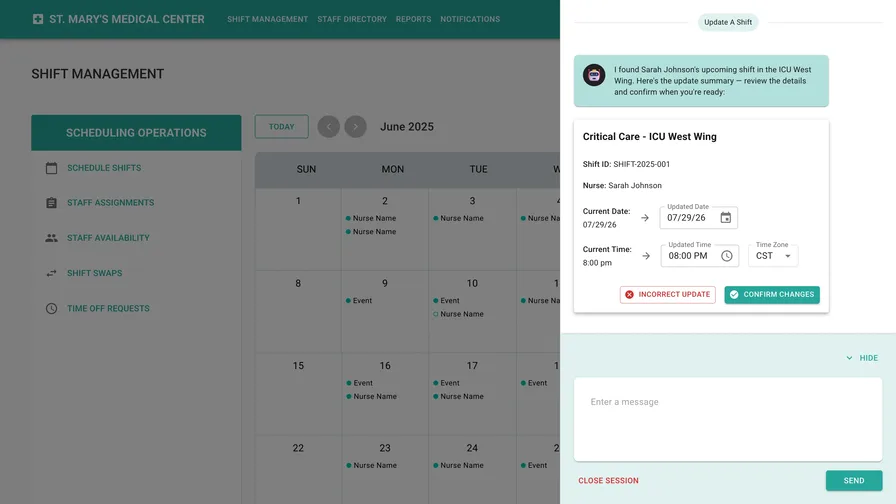
At BP3, I built a proof-of-concept in support of new-business development for an enterprise client: an AI assistant embedded directly in a scheduling application. Instead of hunting through dropdowns to update a schedule, you could just say what you want changed. Everything shown here is white-labeled as hospital shift management. It’s the same product and same code, but a fictional domain, so the work can be shared without revealing the client.
I built the working prototype in about 30 hours over two and a half days, then presented the approach publicly at Remix Austin in August 2025.

The Pitch
Scheduling interfaces are tedious in a way better UI design can’t fully fix. To move one shift, a coordinator digs through options to find the right person, finds when they’re scheduled, figures out how to move them, and then repeats that dance for every change. Even with the best UX, it’s a lot of clicking for a sentence’s worth of intent.
So we pitched the client on a different interaction: say the sentence.

Sarah Johnson has a shift in the West Wing ICU. I need to change it to tomorrow at 8 p.m.
The assistant — a chat panel living inside the scheduling page, with the schedule database behind it — looks up the shift, makes the change, and answers with something better than a paragraph of confirmation text: it fills in the UI. The reply is a summary card with the updated shift laid out in editable fields. If the agent got something wrong — say it assumed the wrong time zone — you correct it right there in the card and confirm. From the same card you can copy the update or send it to the other people affected by the change.
That was the novel part of the design that we hadn’t yet seen done in enterprise software before: the agent doesn’t replace the interface, it operates the interface for you if you ask it to. Structured output where structure helps, conversation where conversation is faster, and a human confirmation before anything is submitted. In the demo, we displayed the data fidelity by allowing the agent to query the database live and return the data on the shift to show that it had actually moved.


From Proof-of-Concept to Full Demo
Before any web UI existed, I wanted to test the agent’s ability to create structured “UI” based on the types of questions the product team had given me. So, the first thing I made was a simplified version of the demo entirely as a terminal user interface (TUI) — a terminal app built with Clack. Clack made it easy to put together a structured visual output and work out quickly how to enable an agent to fill in a user interface using tools and MCP servers.

Once I had it properly filling out the TUI, I moved onto a web UI based on the Figma designs that the UX designer I was working with had put together. The web app that followed is a React Router application with a MUI front end — chosen because the design team at the client I was working with uses Material Design as their design system with both Figma components and React components. This meant that their screens translated into working UI without approximating via handwritten CSS. The prototype grew real product affordances from there: streaming responses, session persistence so conversations survive a refresh, cancellable in-flight requests, and file upload.
How It Works
- The assistant runs on the Claude Code SDK in headless mode through its TypeScript library. I chose this because it was the fastest possible path from zero to a working prototype on the ~1 week timeline I was working with.
- The Claude Code SDK had no native tool calling, so I had two options: I could wire up an MCP server (which I deemed to be too heavy and not worth my time, given the time frame) or I could create an ad-hoc “component registry”. The registry describes each component the agent can answer with, a description of its purpose and its props, injects those schemas into the system prompt via the SDK, and asks the agent to return a strict JSON-only output schema. The client parses the stream and renders real React components from the agent’s JSON response.
- The Claude Code SDK responses stream over server-sent events (SSE) instead of WebSockets to make it easy to receive realtime streaming responses within the React Router framework.
- Speaking of, React Router: React Router framework mode. Strong conventions (file-system routes, loaders, actions, type-safe route modules) mean the agent writing the code knows exactly where things go and what types cross the server/browser boundary. Between the framework’s documentation, its public examples, and a well-workshopped set of agent rules in
CLAUDE.md, the model rarely had room to improvise badly. - Deployment was as dead-simple as possible given all the moving parts: I had Claude write a Dockerfile for Node and deployed the entire thing, exactly as it was running on my machine, to Fly.io.io for the demo. I then redirected the Claude Code SDK running on the Fly VM from my own personal Anthropic API account to the BP3 AWS Bedrock account to avoid farther expense requests.
Opinions, Earned
This project is where my day-to-day agentic workflow got genuinely tested. What held up:
- I wrote maybe a hundred lines of code by hand: The rest was directed. I cropped screenshots out of my designer’s Figma file and dropped them into the conversation. For UI work, screenshots worked really well for me.
- A thorough
CLAUDE.mdis the whole ballgame. When the agent kept reaching foruseEffectwhere the framework had a better primitive, the fix wasn’t correcting each instance — it was interrogating the agent: you did that even though my instructions say not to; what should my instructions say so you never do it again? The rules file is a living artifact and it helps immensely to workshop it with the agent itself. - Have a research model write your reference docs. For each core dependency I had a deep-research run produce current-API, best-practice markdown file, then checked that into the repo somewhere the agent could access it. It gave the agent the most up to date API data, despite what’s in its training corpus.
- Pay for the good model on the hard days. I once left Opus switched on by accident for a full day. It cost a lot money in November 2025 at API pricing from Anthropic but — but! — it was the most productive day of prototyping. That trade is usually worth making.
- Code prototypes beat Figma prototypes. This took less time than wiring hotspots and intermediate states in Figma would have, and users can actually type into it, which no click-through mockup can offer. For anything conversational, keyboard-driven, or stateful, the fidelity gap isn’t even close. This experiment has reshaped how I’ve built every UX prototype since.
In Public
I gave a full walkthrough of the prototype and this workflow at the Remix Austin meetup — the demo below is the same white-labeled build described here.

Outcome
The client decided to adopt a similar agent-assisted scheduling workflow in their product. My involvement ended with the POC, and I was not part of the delivery team. I cannot share the production details or claim its results. The evidence here stops at the decision the prototype supported.